Free OPC UA Client with Real-Time Plotting | OPC Telescope
OPC Telescope is a free OPC UA client with real-time monitoring and live signal plotting. It is portable, cross-platform, and runs without installation. Monitor OPC tags in real time, visualize signal data with live plots, and troubleshoot remote industrial systems from a lightweight modern interface.
Table of contents
- Why you need real-time OPC monitoring
- What OPC Telescope is
- Real-time monitoring, live plotting, and more
- Free and portable design
- Live signal plotting: see every boolean transition
- How OPC Telescope compares to other OPC clients
- Frequently asked questions
Why you need real-time OPC monitoring
Working with industrial automation often means dealing with remote servers across the globe. High latency, limited bandwidth, the need to diagnose issues without local access. These are daily realities for automation engineers.
Traditional OPC clients like Kepware QuickClient work in the office. They fall short when you are troubleshooting from a hotel room with spotty internet. You can see the current value of a tag, but if you need to verify that a boolean signal toggles from false to true and back, you might miss the transition entirely because the refresh rate is too slow.
OPC Telescope is a free OPC UA client with real-time monitoring and live signal plotting, designed for remote troubleshooting in bandwidth-constrained environments.
What OPC Telescope is
OPC Telescope is a free OPC UA client built to address the limitations of traditional clients. It is a small, self-contained binary with all dependencies bundled, so it runs anywhere and copies easily over slow connections. The features that set it apart are real-time monitoring and live signal plotting, which make remote troubleshooting possible.
 OPC Telescope's main interface with node browsing and real-time data monitoring
Real-time monitoring, live plotting, and more
Real-time OPC tag monitoring
OPC Telescope uses OPC UA's publish-subscribe mechanism, not polling. You receive instant updates when tag values change. You do not miss signal transitions, even brief boolean toggles that polling clients lose between refreshes.
Live signal plotting and visualization
The standout feature is live signal plotting. Rolling time-series charts visualize OPC data in real time. You see exactly when values change and analyze signal behavior over time.
 Drag-and-drop interface for adding OPC tags to live monitoring and plotting
Drag-and-drop dashboard
The dashboard is a clean view of your monitored tags with real-time updates. Browse the OPC server, drag tags onto the monitoring area, see values update.
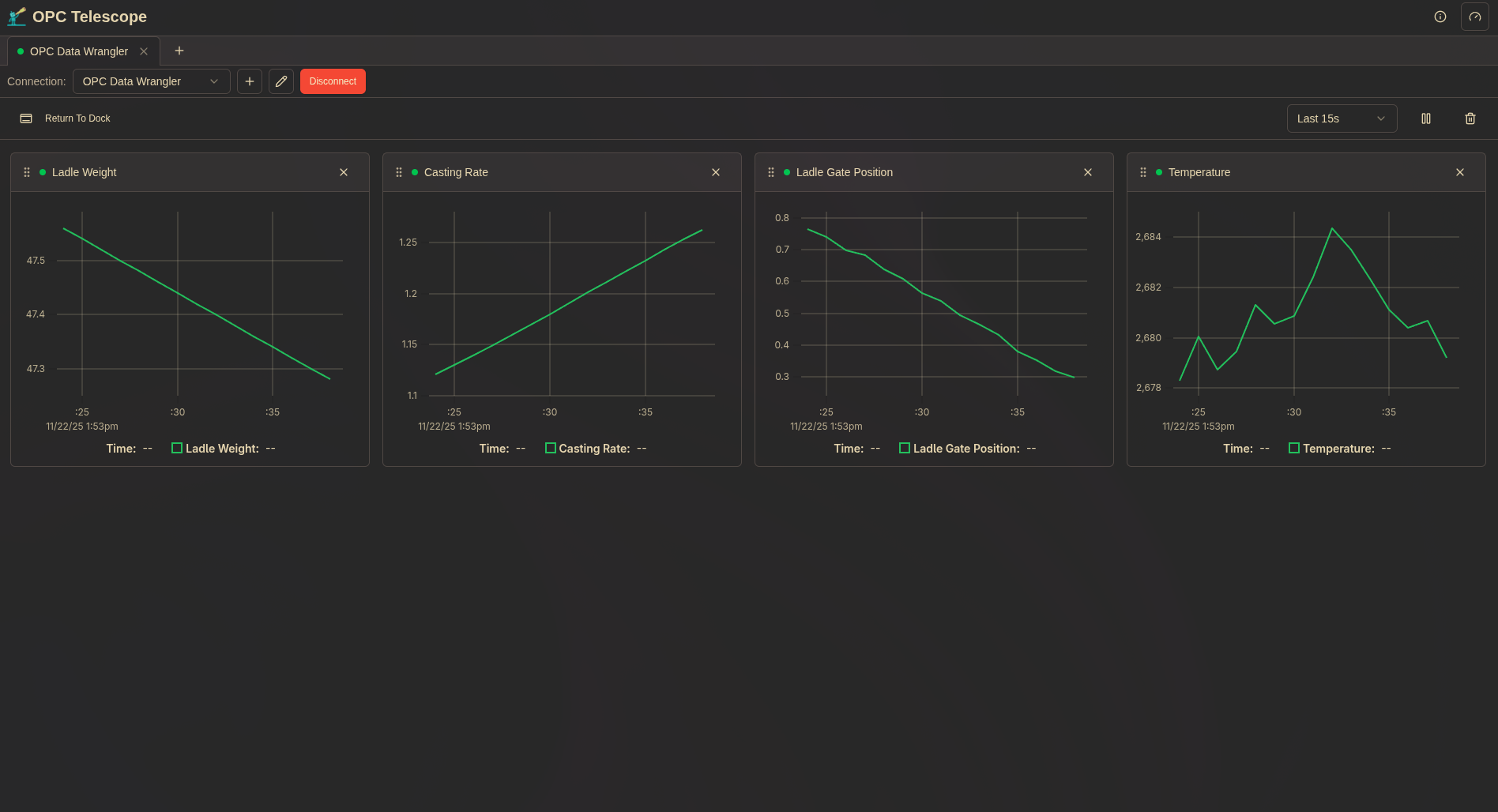 Dashboard showing real-time tag values and live data charts
Themes
OPC Telescope ships with multiple built-in themes for different lighting conditions and long troubleshooting sessions.
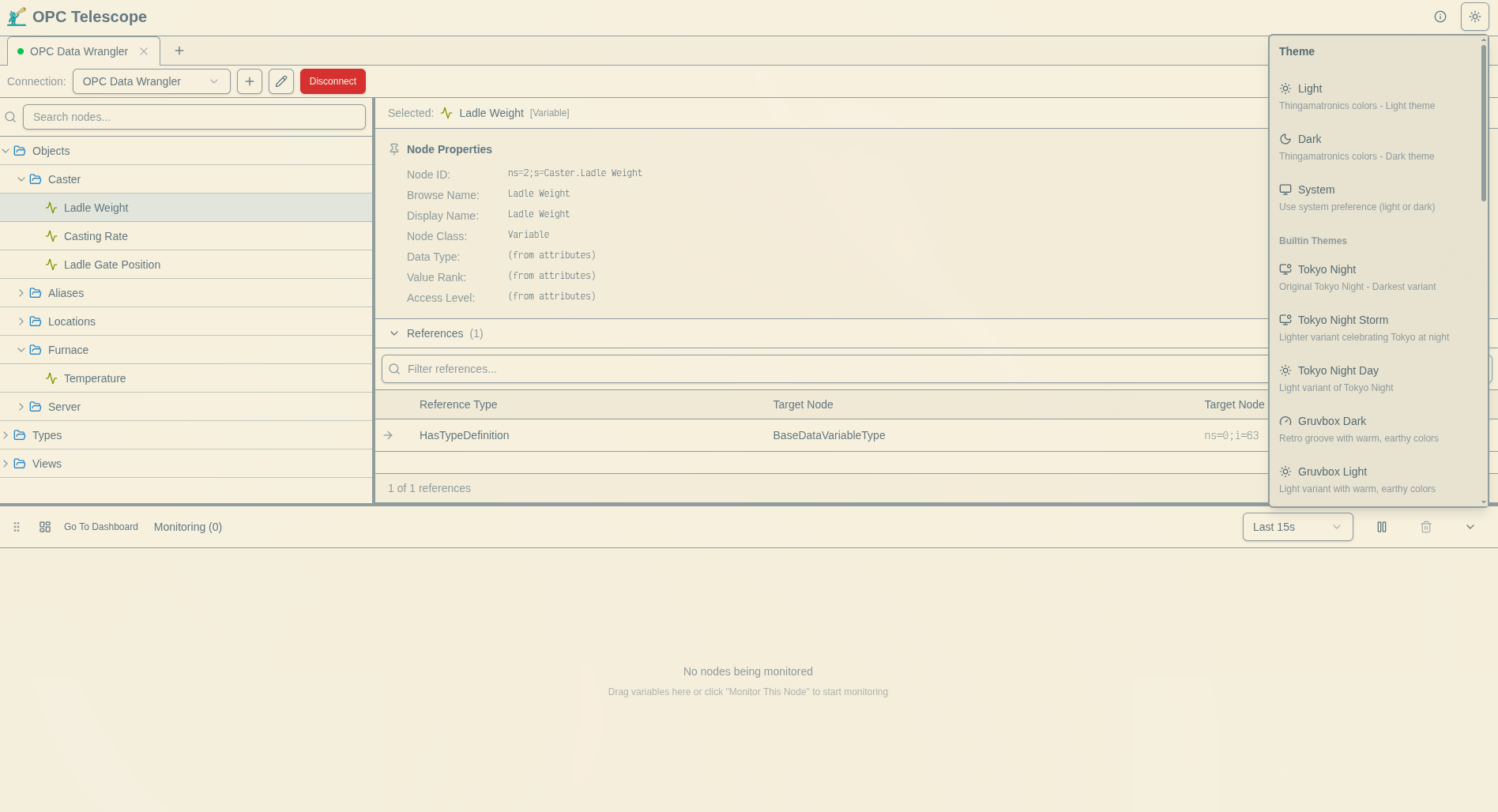 Built-in themes for different lighting conditions
Detailed node information
When you need to understand the structure and properties of OPC nodes, OPC Telescope provides full details (data type, access level, metadata) in a readable format.
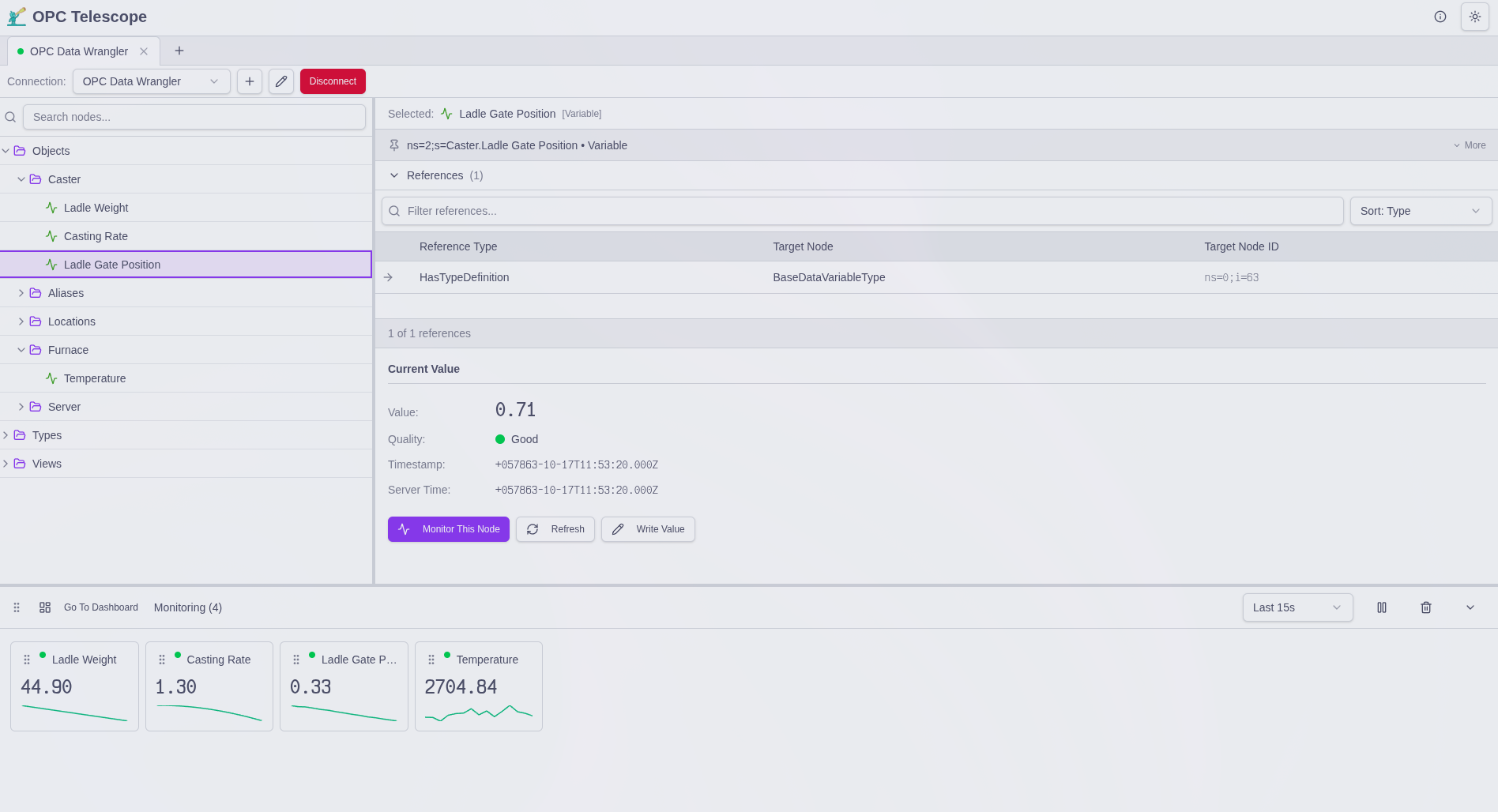 Node information including data type, access level, and metadata
Free and portable design
OPC Telescope is free. No license fees, no subscription costs, no feature limitations. It is built for remote work.
- Free for personal and commercial use, no restrictions.
- Single executable under 10 MB (smaller when zipped). All dependencies bundled.
- No installation. Download and run. Only requires a web browser since it uses a WebUI.
- Cross-platform: Windows at launch, macOS and Linux as fast-followers.
- Low resource usage and fast startup.
Technical specifications
| Specification | Details |
|---|---|
| Price | Free |
| Protocol | OPC UA (IEC 62541) |
| Monitoring method | Publish-subscribe, not polling |
| Platforms | Windows at launch (May 27, 2026) |
| File size | Under 10 MB |
| Dependencies | Web browser (uses WebUI) |
| Installation | Not required |
This portable OPC client fits remote server troubleshooting over limited bandwidth, field service calls, quick diagnostics in production, and development testing across machines.
Live signal plotting: see every boolean transition
Here is the story behind the live plotting feature.
At a previous job, I worked with remote servers in different parts of the world. One day I needed to verify that a boolean signal toggled from false to true and back during a specific process. Using the standard OPC client (Kepware QuickClient), I could only see the current value. Refresh rate plus network latency meant I might easily miss the brief moments the signal changed state. Trying to catch a fleeting event through a narrow window.
I wished there was a way to plot the last few seconds of values, so I could see the transition clearly even if I was not staring at the screen at the exact moment.
I built that into OPC Telescope. Rolling time-series chart, you see exactly when and how the signal behaved.
OPC Telescope also uses OPC UA's publish-subscribe mechanism for monitoring, not polling. You get real-time updates as soon as values change, no missed transitions from network delays or refresh intervals. The difference between a live feed and snapshots every few seconds.
This is about confidence, not just convenience. When troubleshooting critical industrial processes remotely, you need the full picture, not snapshots.
How OPC Telescope compares to other OPC clients
| Feature | OPC Telescope | Prosys OPC UA Browser | UaExpert | Kepware QuickClient |
|---|---|---|---|---|
| Price | Free | Free | Free | Free |
| Live rolling charts | Yes | No | No | No |
| History graphs | No | Yes | No | No |
| Monitoring method | Pub-sub | Polling | Polling | Polling |
| Portable binary | Yes | Yes | No | No |
| Installation | Not required | Not required | Required | Required |
| Cross-platform | Win/Linux/macOS | Win/Linux/macOS | Win/Linux | Windows only |
| File size | Under 10 MB | Over 100 MB | Over 50 MB | Large |
| Drag-drop dashboard | Yes | No | No | No |
All four are credible free OPC UA clients. Prosys OPC UA Browser is a capable option with history graphing. OPC Telescope differentiates with live rolling charts (real-time signal changes, not just historical data), pub-sub monitoring (instant updates without polling delays), and a small footprint (under 10 MB versus 100 MB+, useful over limited bandwidth).
Frequently asked questions
What is OPC Telescope?
OPC Telescope is a free, portable OPC UA client for real-time monitoring and signal plotting. It includes a drag-and-drop dashboard and live data visualization. Windows at launch (May 27, 2026), with macOS and Linux to follow.
Is OPC Telescope really free?
Yes. No license fees, no subscription costs, no feature limitations. Free for personal and commercial use.
Can OPC Telescope plot OPC UA data in real time?
Yes. Live signal plotting with rolling time-series charts. You can visualize OPC tag values over time and catch brief transitions that refresh-based monitoring misses.
How does real-time monitoring work?
OPC Telescope uses OPC UA's publish-subscribe mechanism, not polling. You receive instant updates when tag values change.
What platforms does OPC Telescope support?
Windows at the May 27, 2026 launch. macOS and Linux as post-launch fast-followers. Single portable binary with dependencies bundled, no installation.
How is OPC Telescope different from UaExpert?
UaExpert is a popular free OPC client. OPC Telescope adds real-time signal plotting, a drag-and-drop dashboard, and a portable single-binary design. OPC Telescope is optimized for remote troubleshooting with limited bandwidth.
How is OPC Telescope different from Kepware QuickClient?
Both are free. OPC Telescope is portable (single binary, no installation), includes live signal plotting with rolling charts, runs cross-platform (Windows at launch, macOS and Linux to follow, not Windows-only), and uses pub-sub monitoring instead of polling. Optimized for remote and low-bandwidth scenarios.
Does OPC Telescope require installation?
No. Single-binary application. Download the executable (under 10 MB), extract, run. Requires a web browser since it uses a WebUI. No installer, no configuration files.
Can I use OPC Telescope for commercial projects?
Yes. Free for personal and commercial use, no restrictions.
When can I download OPC Telescope?
Free Windows download on May 27, 2026. macOS and Linux follow. Register for early access to be notified.
Download OPC Telescope
OPC Telescope launches as a free Windows download on May 27, 2026, with macOS and Linux to follow. Register for early access.
For questions or feedback, reach out on LinkedIn or GitHub.
OPC Telescope is built by Thingamatronics, the team behind OPC Data Wrangler.
Ready to Modernize Your OPC Monitoring?
Join engineers using OPC Telescope for remote troubleshooting and OPC Data Wrangler for ETL pipelines. Register today for early access.
About the Author
Chris Laponsie founded Thingamatronics to build modern industrial data engineering tools. OPC Telescope is the free OPC UA client built for remote troubleshooting; OPC Data Wrangler is the broker layer for OPC UA workloads.
More from the Blog
The OPC UA ETL Problem Nobody Talks About: Data Transformation
OPC UA ETL data transformation guide: Learn how to handle unit conversions, formula evaluation, and visual DAG pipelines for industrial automation.
Read Article →Why Industrial Engineers Are Learning Python (And Why Jython Isn't Enough)
Real Python for industrial transforms. Plus: how AI makes Python 10x more productive than DSLs.
Read Article →The True Cost of “Free” OPC Tools
5-year TCO analysis: That $0 tool actually costs $47K
Coming Soon